
Claude AI Can Now Autonomously Perform Tasks on Your Computer — Here’s What That Actually Means.
Anthropic’s Claude just crossed a line that separates chatbots from digital co-workers. It can now open your apps, fill your spreadsheets, and browse the web — all while you’re away from your desk. Here’s a plain-English breakdown of what changed, who gets access, and whether you should actually trust it.
1. What Anthropic Just Announced
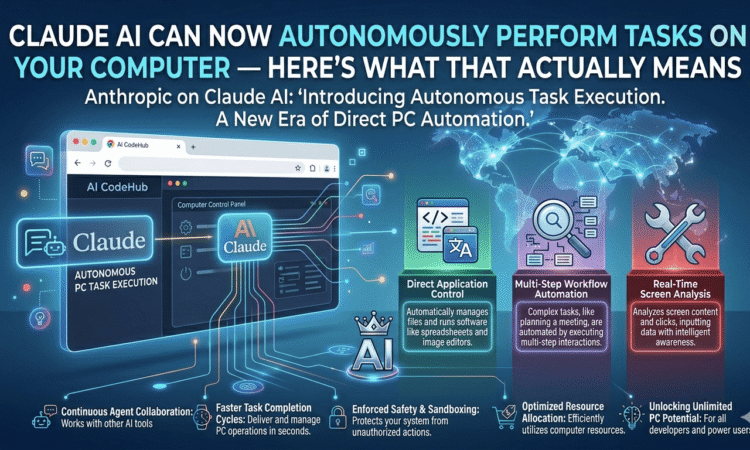
On March 24, 2026, Anthropic officially flipped the switch on something the AI industry had been building toward for years: an AI assistant that doesn’t just answer questions — it does things on your behalf. The company’s Claude AI can now autonomously control a user’s computer, opening applications, navigating browsers, filling spreadsheets, and managing files, all triggered by a simple prompt from your phone.
The feature, called Computer Use, shipped as a research preview inside two products: Claude Cowork (a no-code desktop agent built for everyday knowledge workers) and Claude Code (a terminal-based tool aimed at developers). The announcement racked up massive engagement within hours — a sign that the appetite for this kind of automation is very real.
“You can now enable Claude to use your computer to complete tasks. It opens your apps, navigates your browser, fills in spreadsheets — anything you’d do sitting at your desk.” — @claudeai on X, March 23, 2026″
This isn’t just a feature update. It represents a fundamental shift in what an AI assistant is. For years, tools like Claude, ChatGPT, and Gemini functioned as very smart answering machines. You asked — they replied. Now Claude can act. That distinction changes everything about how we think about productivity software, personal automation, and yes, the risks that come with handing a machine the keys to your digital life.
KEY FACTS AT A GLANCE
| Fact | Detail |
|---|---|
| Launch Date | March 24, 2026 |
| Minimum Plan | $20/month (Claude Pro) |
| OSWorld Benchmark | 72.5% (Sonnet 4.6) |
| Platform | macOS only (currently) |
2. How Claude’s Computer Use Actually Works
Most people picture AI automation as scripted macros or rule-based bots. Claude’s approach is fundamentally different — and far more flexible. Rather than following a predetermined script, Claude operates through a vision-action loop: it takes a screenshot of your screen, figures out what to click or type next, takes another screenshot, and repeats until the task is done.
This design means it can handle software it has never been explicitly programmed for. Your legacy accounting app from 2009 with no API? Claude can navigate it just like a human would — by reading the screen.
The Two-Layer Architecture
Step 1 — Integration-First (Preferred) Claude checks whether it has a supported connector — like Gmail, Google Drive, Slack, or GitHub — for the task at hand. If it does, it uses that direct API connection. This is faster, more reliable, and leaves a cleaner audit trail.
Step 2 — Computer Control (Fallback) If no integration exists, Claude falls back to simulating a human user — moving the cursor, clicking buttons, typing text, and reading whatever appears on-screen. This is how it handles software with no public API.
A new sub-feature called Dispatch lets you assign tasks from your smartphone while away from your desk. Claude then completes them on your computer in the background. You can also schedule recurring tasks — such as “generate my weekly status report every Friday morning” — directly from the Cowork interface.
Technical Note: Claude asks for explicit permission before accessing any new application. It takes screenshots to navigate, but users can pause or stop the process at any time from the Claude interface.
3. Who Can Use It Right Now
As of March 2026, Computer Use is available in a research preview. Here’s exactly who has access:
| Plan | Monthly Price | Computer Use | Platform | Access Via |
|---|---|---|---|---|
| Free | $0 | ✗ Not Available | — | — |
| Pro | $20/mo | ✓ Available | macOS | Claude Cowork, Claude Code |
| Max | $100/mo | ✓ Available | macOS | Claude Cowork, Claude Code |
| Team | $25/seat/mo | ✓ Available | macOS | Cowork + Org Controls |
| Enterprise | Custom | ✓ Available | macOS | Full Suite + Audit Logging |
Windows support has not yet been announced. Developers using the API can access Computer Use through the Claude API’s beta tools, which are platform-agnostic.
4. Real-World Use Cases: What Can You Actually Do With This?
For Knowledge Workers (Claude Cowork)
Imagine you’re in back-to-back meetings all morning. You’ve asked Claude the night before to collect your team’s status updates from Slack, pull last week’s numbers from a Google Sheet, and compile them into a formatted report — saved to your desktop before 9am. That’s the kind of background automation Cowork enables without writing a single line of code.
Other popular workflows include: exporting a pitch deck as PDF and attaching it to a calendar invite, filling a spreadsheet with data pulled from multiple browser tabs, and batch-renaming or organizing files in a local folder.
For Developers (Claude Code)
Developers get an even more powerful version of the same engine. Claude Code can make changes inside an IDE, submit pull requests, run test suites, and flag failures — leaving the engineer free to focus on design decisions rather than boilerplate execution. The coding assistant is widely regarded as the best in its class, particularly when paired with the Opus 4.6 model.
For Legacy Systems and No-API Environments
Perhaps the most underappreciated capability is Claude’s ability to interact with software that has no modern API. Enterprise tools built on Citrix, old ERP systems, or internal web portals that predate REST APIs are suddenly automatable — because Claude navigates them visually, just as a human employee would.
“The real story is something most people missed: Claude Computer Use turns the desktop into an integration layer. Your mainframe with no API. Your Citrix app from 2003. Your legacy ERP that nobody’s touched in decades.”
5. Claude vs. ChatGPT Agent Mode vs. Google Gemini
| Feature | Claude (Cowork/Code) | ChatGPT Agent Mode | Gemini Computer Use |
|---|---|---|---|
| Minimum Price | ✅ $20/mo | ❌ $200/mo | Varies |
| Runs Locally | ✅ Yes — full local access | ❌ Sandboxed cloud only | Partial |
| Access to Local Files | ✅ Yes | ❌ No | Limited |
| Browser Benchmark | ⚠️ 56% success rate | ✅ 87% success rate | Not disclosed |
| Coding Tasks | ✅ 49% (leads category) | ❌ Not designed for this | Emerging |
| Global Availability | ✅ Global | ❌ US-only (early 2026) | Expanding |
| No-Code Interface | ✅ Cowork | Partial | Partial |
The headline conclusion: ChatGPT agent mode is currently more reliable for pure web browsing tasks, posting an 87% benchmark success rate versus Claude’s 56%. However, Claude pulls ahead on coding, local file access, and price — making it the stronger choice for developers and power users who need genuine desktop-level control.
6. Security & Privacy: The Honest Picture
Granting an AI access to your computer is a significant trust decision. Anthropic has built real safeguards — but the risks are worth understanding honestly.
What Anthropic Built to Protect You
1. Permission-First Access Claude requests explicit permission before interacting with any new application. You can stop the process at any time.
2. Trained to Avoid Sensitive Data Claude is trained to steer clear of stock trading interfaces and avoid capturing facial images from your camera.
3. Content Classifiers All untrusted content entering Claude’s context is scanned to flag potential prompt injection attempts.
4. Isolated VM for Remote Sessions When using Claude Code on the web, each session runs in an isolated, Anthropic-managed virtual machine with restricted network access.
What You Should Still Watch Out For
⚠️ Anthropic’s Own Warning: Anthropic explicitly recommends closing sensitive files — financial documents, medical records, credential stores — before running Cowork. Because Claude takes screenshots to navigate, anything visible on-screen could be read during a session.
Security researchers have documented real vulnerabilities in adjacent tooling. Check Point researchers found flaws in Claude Code (now patched) that could have allowed malicious repository files to execute arbitrary commands or exfiltrate API keys. Separately, a research team identified an attack chain called “Claudy Day,” demonstrating how a manipulated webpage could, via prompt injection, cause Claude to silently exfiltrate sensitive data.
Anthropic also noted: “Cowork activity is not captured in audit logs, Compliance API, or data exports. Do not use Cowork for regulated workloads.” That’s a significant constraint for healthcare, legal, and financial services contexts.
7. Frequently Asked Questions
Can Claude AI control my computer? Yes. As of March 24, 2026, Anthropic launched a Computer Use research preview that lets Claude open applications, navigate browsers, fill spreadsheets, and manage files on your Mac — triggered from your phone or desktop.
Is Claude’s computer use available on Windows? Not yet. As of the March 2026 launch, Computer Use is macOS-only. Anthropic has not provided a public timeline for Windows. Developers on the API can access the capability platform-agnostically.
What’s the difference between Claude Cowork and Claude Code? Cowork is for non-technical users — a no-code interface for knowledge workers automating tasks like report generation. Claude Code is the developer tool, with IDE integration, pull request submission, and test running capabilities.
Does Claude watch my screen while it works? Yes — to navigate apps without direct integrations, Claude takes periodic screenshots to understand the current screen state. Anthropic advises closing sensitive windows before starting a session.
How does Claude compare to ChatGPT agent mode? ChatGPT’s agent mode currently outperforms Claude on web browser benchmarks (87% vs 56%). However, Claude runs locally with full file access, is available globally, and starts at $20/month vs. $200/month for ChatGPT’s comparable features.
What is the Dispatch feature? Dispatch lets you assign tasks to Claude from your smartphone. Your Mac runs the task in the background while you’re away. You can also set recurring scheduled tasks.
8. The Verdict
Claude’s computer use capability is one of the most meaningful AI product developments of 2026 — not because it’s perfect, but because it’s genuinely accessible. For the first time, non-technical users on a $20/month subscription can automate complex multi-step desktop tasks without writing code or configuring automation platforms.
The caveats are just as real. Browser task reliability still lags behind ChatGPT’s agent mode. Windows support doesn’t exist yet. The security surface — prompt injection, screenshot-based navigation, broad file access — demands thoughtful hygiene from users and careful governance from enterprises.
For developers already in the Claude Code ecosystem, the upgrade is seamless and compelling. For knowledge workers curious about AI automation, Cowork lowers the barrier to entry more than any tool before it. The window between “AI as advisor” and “AI as doer” is officially closed.