
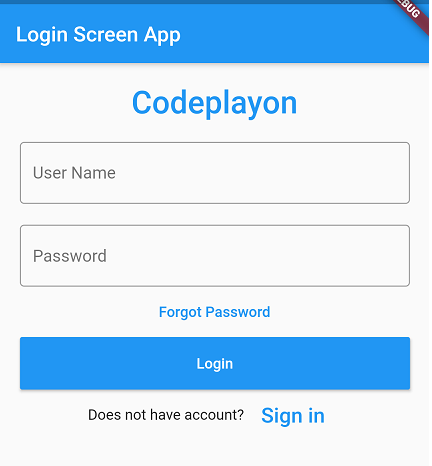
Hi Everyone in this flutter Tutorial I am, sharing a Simple flutter login screen UI example. Build a flutter login screen example and source code. In this login screen UI design, I am using TextField, FlatButton.
https://www.youtube.com/watch?v=NIBFz4dZy4c
Flutter login screen you can add username, Password, and button. and also add a test for the logo name and signup. this all, for example, I use a flutter widget, for Login screen UI design, Text widget, input widget, button widget also.
Simple flutter login screen UI example
main.dart file source code.
import "package:flutter/material.dart";
import 'app_example/Login_Screen.dart';


void main() => runApp(MyApp());

class MyApp extends StatelessWidget {
  @override
  Widget build(BuildContext context) {
    return MaterialApp(
        theme: ThemeData(primarySwatch: Colors.blue), home: LoginPage());
  }
}
After adding these codes in your main. dart file creates an app_example package in your lib folder. in the app_example package make a dart file with the name Login_Screen.dart. Simple flutter login screen UI example.
Login_Screen.dart File source code.
import 'package:flutter/material.dart';


class LoginPage extends StatefulWidget {

  @override
  State<StatefulWidget> createState() => new _State();
}

class _State extends State<LoginPage> {
  TextEditingController nameController = TextEditingController();
  TextEditingController passwordController = TextEditingController();

  @override
  Widget build(BuildContext context) {
    return Scaffold(
        appBar: AppBar(
          title: Text('Login Screen App'),
        ),
        body: Padding(
            padding: EdgeInsets.all(10),
            child: ListView(
              children: <Widget>[
                Container(
                    alignment: Alignment.center,
                    padding: EdgeInsets.all(10),
                    child: Text(
                      'Codeplayon',
                      style: TextStyle(
                          color: Colors.blue,
                          fontWeight: FontWeight.w500,
                          fontSize: 30),
                    )),
                Container(
                  padding: EdgeInsets.all(10),
                  child: TextField(
                    controller: nameController,
                    decoration: InputDecoration(
                      border: OutlineInputBorder(),
                      labelText: 'User Name',
                    ),
                  ),
                ),
                Container(
                  padding: EdgeInsets.fromLTRB(10, 10, 10, 0),
                  child: TextField(
                    obscureText: true,
                    controller: passwordController,
                    decoration: InputDecoration(
                      border: OutlineInputBorder(),
                      labelText: 'Password',
                    ),
                  ),
                ),
                FlatButton(
                  onPressed: (){
                    //forgot password screen
                  },
                  textColor: Colors.blue,
                  child: Text('Forgot Password'),
                ),
                Container(
                    height: 50,
                    padding: EdgeInsets.fromLTRB(10, 0, 10, 0),
                    child: RaisedButton(
                      textColor: Colors.white,
                      color: Colors.blue,
                      child: Text('Login'),
                      onPressed: () {
                        print(nameController.text);
                        print(passwordController.text);
                      },
                    )),
                Container(
                    child: Row(
                      children: <Widget>[
                        Text('Does not have account?'),
                        FlatButton(
                          textColor: Colors.blue,
                          child: Text(
                            'Sign in',
                            style: TextStyle(fontSize: 20),
                          ),
                          onPressed: () {
                            //signup screen
                          },
                        )
                      ],
                      mainAxisAlignment: MainAxisAlignment.center,
                    ))
              ],
            )));
  }
}
after completing, these steps run your app and see a result for the sing-in-screen example. simple and attractive dart sing in design and Simple flutter login screen UI example.
Flutter Login Screen UI example Full Souce Code on Github