
Promotional, tutorial, and social media videos often have text overlays. These overlays sometimes intersect important visual content or objects in the shot. Cropping can be an issue where most of the text is removed accidentally. These inaccuracies discourage visual narration and reduce the interest of viewers. AI editing platforms today address this problem through intelligent framing. Smart framing maintains the principal subject and automatically changes the composition. Editors are not disruptive to balance visual context or scene integrity. This will enhance the clarity of various video types and publication sites. Social networks such as Pippit make it easy by allowing automated editing. Professional composition is not compromised, as content creators can remove unwanted overlays. Consequently, videos are kept visually balanced, informative, and attractive to viewers.

How Text Overlays Disrupt Visual Composition
Text overlays often take the focus off the subject performing the significant action. Major captions take over overcrowded frames and take up space on a visual plane at the cost of meaningful information. This intrusion compromises narration and scenes. At times, graphics can mask important gestures, expressions, or objects. The viewers can misunderstand the subject matter of the scene. The objective of editors, then, is to extract the text from the video footage without removing the main topic. Nonetheless, basic cropping can occasionally cut crucial visual content. Intelligent editing applications minimize this danger by analyzing the placement of the subjects initially. Pippit assists with the precision of framing. by making AI-based adjustments. This option maintains the visual image’s flow without adding unnecessary features.
The Role of Smart Framing in Modern Video Editing
Smart framing has changed the way editing is done with the addition of automated scene analysis. The artificial intelligence recognizes individuals, objects, and movement patterns within the footage. These elements are then prioritized in the system when cropping or resizing. The AI tracking keeps the central figure in focus throughout the video. Dynamic cropping changes the frame boundaries whenever there is movement. This avoids non-intentional clipping in complicated scenes. Another advantage is that the editors can use horizontal footage and transform it into vertical formats. Different aspect ratios are needed on social media platforms to be well-presented. Smart reframing makes those formats have similar subject visibility. Pippit combines these tricks to make professional video creation easier.
Techniques to Remove Text Without Losing Key Elements
Various editing effects are used to remove text from video and maintain picture clarity. Auto-reframing keeps the subject in focus when making cropping adjustments. Object tracking prevents inadvertent frame loss. In some instances, the editors change the background to hide captions within. Overlay masking: overlay targets with design items or graphics to hide undesired parts. Freeze-frame effects stop the action, allowing any undesirable objects to be accurately concealed. The two methods are best suited to different circumstances. Background replacement is typically applicable in solid background videos. Dynamic cropping and accurate tracking are needed in action-packed shots. Pippit unifies these tricks under a single editing environment. With this integration, complex adjustments are easier to make without altering the scene’s original balance.
Steps to Remove Text From Video to Keep Your Main Subject Perfectly Framed
Step 1: Upload footage where text distracts from your main subject
- Start by registering for Pippit using Google, TikTok, or Facebook credentials for quick platform access.
- After entering the dashboard, click “Video Generator” located on the left navigation sidebar.
- From the available tools, select “Video editor” to open the complete editing interface.
- Drag your video directly into the workspace to start editing instantly.
- Another option is to press “Click to Upload” and import the file from your computer.
Step 2: Reframe the video so that the text disappears while the subject remains centered
- Inside the editing window, open “Smart tools” and choose “Auto reframe” from the menu.
- Adjust the “Aspect ratio” depending on where the final video will be published.
- Choose “Manual crop” or “Auto reframe”, then click “Apply” to refine composition.
- The cropping process automatically removes watermarks, captions, or typefaces without cutting important subjects.
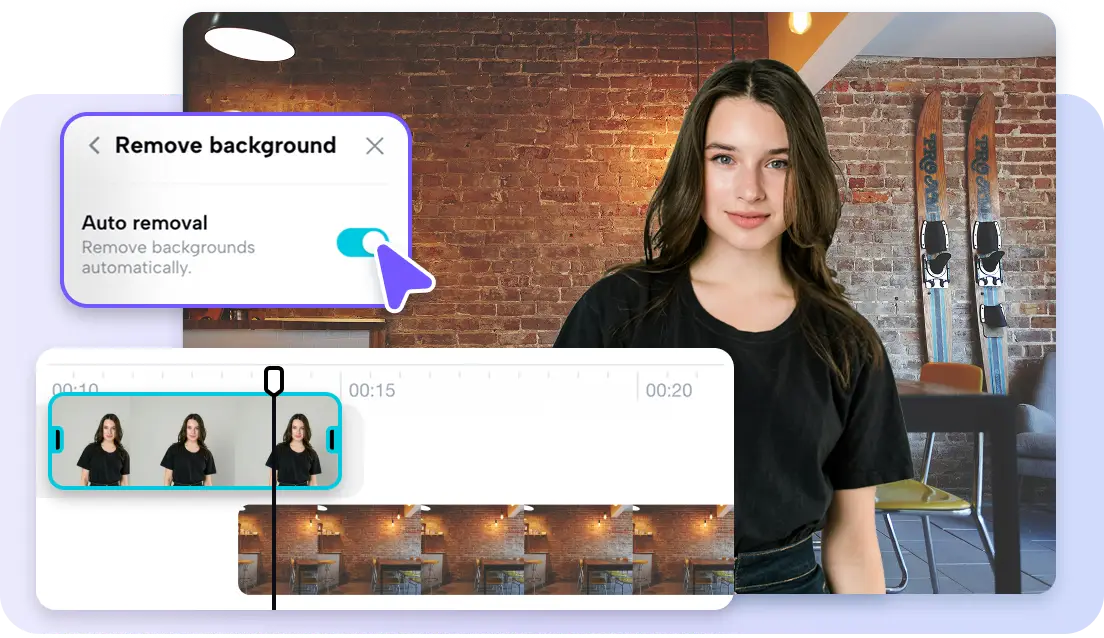
- You may also activate “Remove background” and enable “Auto removal” for additional text cleanup.
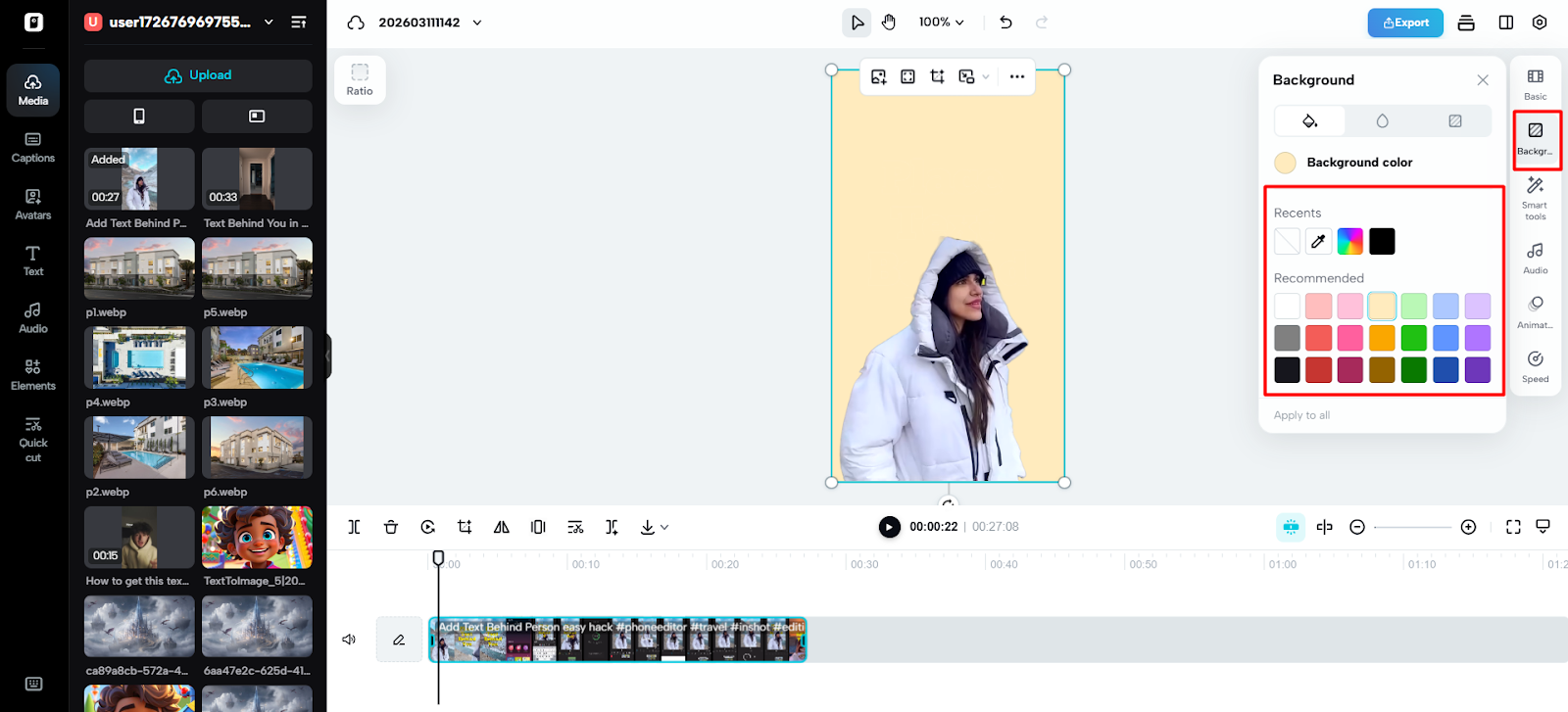
- Next, open “Background” and apply solid-color images or stock videos behind the subject.
Step 3: Export the perfectly framed and text-free footage
- After completing the adjustments, click “Export” in the upper-right corner of the interface.
- Select “Publish” for instant distribution online or choose “Download” to save locally.
- Configure export settings, including format, frame rate, resolution, watermark options, and final quality level.
- Press “Export” again to complete downloading or instantly share the refined video online.
When Smart Framing Matters Most in Video Editing
Some video types can be greatly enhanced through smart framing changes. In interviews, it is necessary to see the speaker’s face and expressions. Product demonstrations require a high level of attention to detail on small items or parts of the devices. Action scenes are taken up by constant movement throughout the frame. Cropping can eliminate vital motion information without tracking. Drone shots show expansive areas with little of the subject’s space used. Smart reframing finds the key element even in extensive aerial shots. Balanced framing is also necessary in educational videos to aid in visual explanations. Social media videos have the advantage of rapid changes in aspect ratio. Pippit reinforces these applications by automated scene recognition and motion tracking.
Notable Features in Pippit That Preserve Video Framing
High-quality AI within Pippit assists in staying professional when editing tricky shots, such as a visual isolation tool that may be similar to a transparent background maker.
Key capabilities include:
- Auto subject detection
Identifies primary objects or people within the frame automatically. Maintains focus when cropping or adjusting composition.
- Dynamic frame adjustment
Automatically changes framing as the subject moves. Eliminates unintentional clipping when moving at high speed.
- Aspect ratio optimization
Supports wide-screen, square, and vertical formats. Eases social media content cross-platform publishing.
- Camera tracking integration
Tracks movement between scenes and framing. Keeps the subjects’ positions in motion.
- High-quality export tools
Maintains original resolution and frame rate. Holds cinema quality following editing.
Conclusion
Professional video editing requires removing unwanted overlays without compromising the composition. Incorrect cropping normally damages narration and the composition of the picture. The solution to this issue is intelligent framing, which involves automatic detection and tracking of subjects. AI tools do not lose focus, but shift frame boundaries. This is simplified with platforms such as Pippit that have built-in editing features. The editors are able to clean the overlays without losing the visibility of the subject. The result is a smooth video, which is able to deliver the message to the viewers. Smart framing, therefore, is an essential element of modern content production.