
Targeting S+ (version 31 and above) requires that one of FLAG_IMMUTABLE or FLAG_MUTABLE
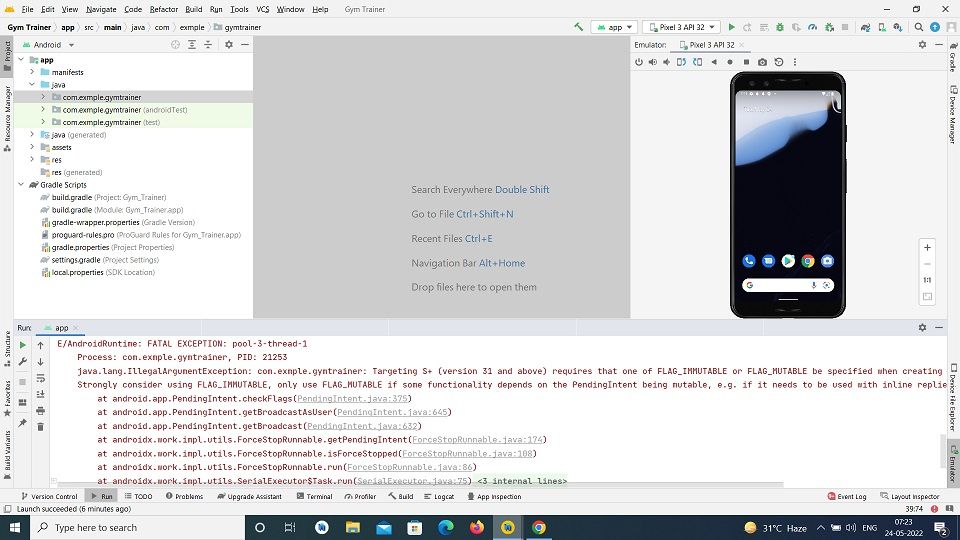
Hi Developer in this android studio article I share how to fix Targeting S+ (version 31 and above) requires that one of FLAG_IMMUTABLE or FLAG_MUTABLE. This issue comes when you upgrade your android project and Run your App Android 12. Google has toled to use the FLAG_IMMUTABLE or FLAG_MUTABLE for the PendingIntent. When you run your App on android 12 it clearly shows on logcat When you Targeting S+ (version 31 and above) requires that one of FLAG_IMMUTABLE or FLAG_MUTABLE be specified when creating a PendingIntent. Strongly consider using FLAG_IMMUTABLE, only use FLAG_MUTABLE if some functionality depends on the PendingIntent being mutable, e.g. if it needs to be used with inline replies or bubbles.
How to Fix Targeting S+ (version 31 and above) requires that one of FLAG_IMMUTABLE or FLAG_MUTABLE
You can check your project and find out where you used PendingIntent and made changes on their PendingIntent call. I am used this Android SDK version see bewlo
android {
    compileSdkVersion 32
    buildToolsVersion "30.0.3"
    defaultConfig {
        applicationId "com.exmple.gymtrainer"
        minSdkVersion 19
        targetSdkVersion 32

    }

}
In this App i traget the compileSdkVersion 32 and the targetSdkVersion 32
Android Project base Gradle build is
buildscript {
    ext.kotlin_version = '1.3.40'
    repositories {
        google()
        jcenter()
        mavenCentral()
        gradlePluginPortal()
    }
    dependencies {
        classpath 'com.android.tools.build:gradle:7.1.3'
        classpath "org.jetbrains.kotlin:kotlin-gradle-plugin:$kotlin_version"

        // NOTE: Do not place your application dependencies here; they belong
        // in the individual module build.gradle files
    }
}
And the Gradle Build Tools Version is 7.1.3 classpath ‘com.android.tools.build:gradle:7.1.3’.
The last gradle change is to remove the apply plugin: 'kotlin-android-extensions' statement from the app build.gradle since it is no longer needed. This will cause a few errors and warnings that need to be fixed before addressing the pending intent immutability flags.
Also Add the android:exported="true" attribute for the main activity in the AndroidManifest.xml.
<activity
    android:name=".HomeScreen"
    android:screenOrientation="portrait"
    android:theme="@style/AppTheme.NoActionBar"
    android:exported="true">
    <intent-filter>
        <action android:name="android.intent.action.MAIN" />

        <category android:name="android.intent.category.LAUNCHER" />
    </intent-filter>
</activity>
And Also Update the All receiver in your Manifest file using with Intent Filter .
<receiver android:name=".WorkoutActivitys.pill_reminder.BootReceiver"
    android:exported="true">
    <intent-filter>
        <action android:name="android.intent.action.BOOT_COMPLETED" />
    </intent-filter>
</receiver>
Now, we need to address the pending intent immutability. For pending intent, we need to explicitly tell the OS that this pending intent can be modified by adding PendingIntent.FLAG_MUTABLE.
Targeting S+ (version 31 and above) requires that one of FLAG_IMMUTABLE or FLAG_MUTABLE
for the issue Targeting S+ (version 31 and above) requires that one of FLAG_IMMUTABLE or FLAG_MUTABLE you can used below steps
Firstly Add Dependay and Syn project
//Work Manager dependency
implementation 'androidx.work:work-runtime:2.7.1'
If you are using Kotlin used this
implementation 'androidx.work:work-runtime-ktx:2.7.1'
After that you can used bewlo code for PeddingIntnet for notification
PendingIntent pendingIntent = null;
if (Build.VERSION.SDK_INT>= Build.VERSION_CODES.S){
     pendingIntent = stackBuilder.getPendingIntent(1, PendingIntent.FLAG_MUTABLE);

}else {
     pendingIntent = stackBuilder.getPendingIntent(1, PendingIntent.FLAG_UPDATE_CURRENT);

}
Also used like the when used reciver
PendingIntent broadcast = null;
if (VERSION.SDK_INT>= Build.VERSION_CODES.S){
    broadcast = PendingIntent.getBroadcast(getApplicationContext(), 0, new Intent(getApplicationContext(),
AlarmReceiver.class), PendingIntent.FLAG_MUTABLE);

}else {
     broadcast = PendingIntent.getBroadcast(getApplicationContext(), 0, new Intent(getApplicationContext(),
 AlarmReceiver.class), 0);
}
Intrinsics.checkExpressionValueIsNotNull(broadcast, "PendingIntent.getBroadca…ionContext, 0, intent, 0)");
Intrinsics.checkExpressionValueIsNotNull(broadcast, "Intent(applicationContex…, 0, intent, 0)\n        }");